1. Find the agreement and the current wording
An agreement may be spread across an inbox, a shared drive, and a spreadsheet. A shared contract record gives the team a place to find the executed document, related amendments, ownership, and status. Search is more useful when the result leads to the actual source.
Start with a common question such as ‘Which agreement covers this supplier?’ Check whether a colleague can answer it and identify the right version. Our contract organization guide describes a practical cleanup process.
2. Keep legal, procurement and finance on the same version
The costliest handoff is often a correct decision about yesterday’s document. Put the saved version, the reviewer’s question and the decision together. Give the next person a link to that record. A message that says “Legal is good with this” leaves out exactly what Legal saw.
Agree on who owns each decision and where an exception goes. Procurement can confirm a service description, Finance can approve payment timing, and counsel can review an acceptance clause that changes when payment becomes due. Check where work waits and whether the receiving person can proceed. The small-team approval example shows how to set up that route.
Follow a payment clause from negotiation to the invoice queue
Fictional procurement example. Version 2 of a service order calls for a $12,000 installation invoice on delivery. Finance approves it. The supplier then agrees to invoice only after written acceptance of the installation. The dollar amount is identical, but the trigger has changed. Here is what each person needs next.
- Procurement saves Version 3. The buyer links the supplier’s revision, identifies the changed invoicing paragraph and asks the service owner who can accept the installation. Version 2 and its earlier decision stay in the history.
- Legal and Finance resolve the change. Counsel confirms how the order fits with the master agreement and whether silence could count as acceptance. Finance reviews the new trigger against the payment arrangement. The contract owner requests the required approvals for Version 3 and checks the signing copy against it.
- Operations records the event. After signature, the facilities lead receives an installation acceptance task with its source paragraph. A delivery ticket proves the equipment arrived. The lead records the actual test result and, if accepted, attaches the dated acceptance.
- Accounts payable checks the evidence. When the invoice arrives, AP opens the executed order and the acceptance record. If acceptance is pending, AP asks the named owner to resolve it before authorizing payment under this example.
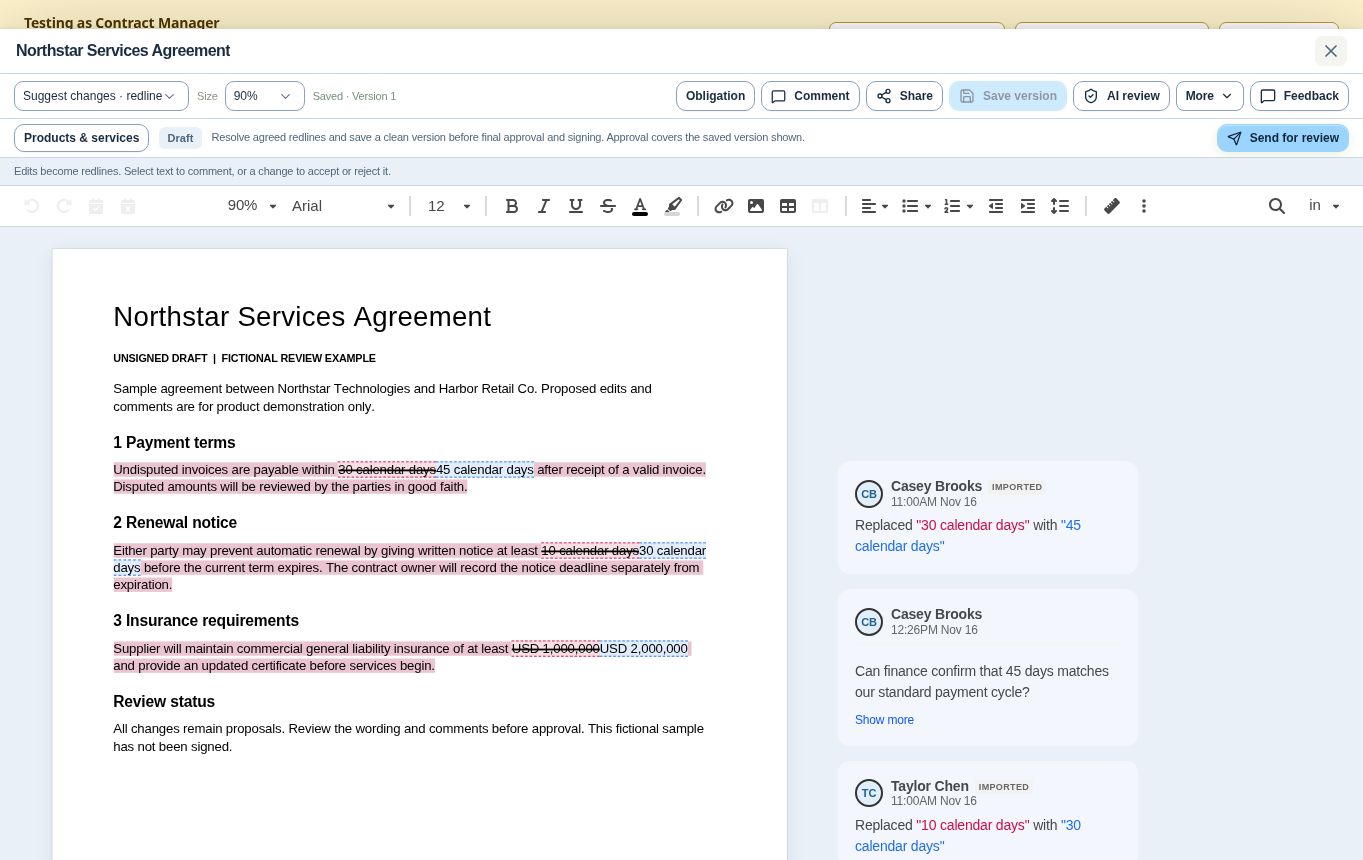
In ContraxAware, document redlines and comments show proposed wording. Version-specific approval decisions show what the team authorized. Once the contract is signed, obligation records connect an action and its evidence to the saved agreement.
3. Act before the notice deadline
A contract end date is not always the date that requires action. A renewal or cancellation clause may require notice earlier. Keep the wording, calculated deadline, decision owner, and reminder plan together.
Test whether an owner can record a decision and keep evidence of any required notice. A reminder helps start the work; it does not perform the contractual notice step. The renewal process guide explains the distinction.
4. Turn commitments into accountable work
Signed agreements can create payment, delivery, onboarding, reporting, or insurance tasks. Connect each obligation to an owner, timing, source clause, and completion evidence so the agreement remains useful after signing.
Distinguish an owner’s report from verification where your process requires a check. When a deadline changes, retain the agreed reason and the previous date. That record helps the next person understand what happened.
5. Make handovers and portfolio reviews easier
When a colleague changes roles, the agreement should not depend on their memory. A connected record helps the new owner find the current documents, open issues, important dates, and pending commitments.
Use consistent fields and definitions so portfolio reviews compare similar work. Keep access appropriate to the record and confirm that the people responsible can actually find what they need. Contract owner handover is a useful test of how complete your records are.
Evaluate the benefits with a small pilot
Pick a representative group of agreements and establish a baseline before changing the process. Record how long it takes to locate the governing document, where approvals wait, and how often a due obligation has the evidence needed to close it.
Review the same work after the pilot and check the underlying records. ContraxAware connects contract documents and workflows in one workspace. The operational result still depends on accurate records, suitable configuration, and people following the process; no particular savings or performance improvement is guaranteed.
Run a pilot your finance lead can reproduce
Choose a small group of comparable agreements and a colleague who did not negotiate them. Give that person the same type of question before and after setup. For the installation example, start the clock when AP receives the supplier name and stop it when AP finds both the governing payment clause and the acceptance evidence. Record an incomplete attempt even if the document was found quickly.
Keep separate measures for time and accuracy. If a fictional pilot produced complete evidence in six of eight lookups, report “6 of 8 lookups had both items.” Record what the other two lacked before expanding the pilot. Faster retrieval of a superseded order is a failed test.
Download the cross-team handoff pilot worksheet (Excel). Use the same controls when evaluating contract management software for your business.
| Job to test | Measure before and after |
|---|---|
| Find the governing agreement | Time a colleague opening the correct signed version and its latest amendment. |
| Hand off an approval | Record the elapsed time from assignment to the reviewer’s first action. Identify the step with the longest wait. |
| Act on an upcoming renewal | Count the approaching notice deadlines with a verified date, named decision owner, and a planned review. |
| Confirm an obligation is complete | Sample due obligations and check how many have both a recorded decision and the required evidence. |
Frequently asked questions
How can contract management software improve collaboration between teams?
Use a shared record for the current draft, the assigned reviewer, and the decision. Test a handoff from procurement to legal and ask the receiving reviewer to find the right file and next action independently.
What contract management benefit should we measure first?
Pick the job that repeatedly costs your team time or creates risk. If renewals regularly surprise finance, measure how many upcoming decisions have a confirmed date and an owner.
How can we make a fair before-and-after comparison?
Use a similar mix of agreements, the same starting point, and the same definition of a completed task. Keep the underlying counts and note exceptions that could explain the difference.