What a contract approval workflow should decide
A contract approval workflow is the route a draft follows before it can move to signature. For a small team, the goal is not to add reviewers to every agreement. It is to make four things explicit: what each person decides, when that decision is required, which saved version they reviewed, and what happens if the wording changes.
Review, approval, and signature are different actions. A subject-matter reviewer can check service scope without having authority to approve the spend. A manager can approve the business case without giving legal advice. An authorized signer may sign only after the organization’s required decisions are complete. Write those distinctions into the process instead of relying on job titles alone.
This guide describes an operational workflow, not a rule for who has authority in your organization. Confirm approval thresholds and signing authority with the people responsible for your policies.
Start with decision rules, not a long list of names
A route is easier to maintain when it is based on decisions. Names change; responsibilities usually change less often. A practical small-team policy might ask:
- Business owner: Does the scope solve the stated need, and can the team perform its responsibilities?
- Finance: Is the committed spend within budget, and are payment terms acceptable under the team’s policy?
- Legal or an authorized reviewer: Does the draft depart from approved wording or create an issue that needs a legal decision?
- Information security or privacy: Will the supplier handle data or access systems in a way that triggers a specialist review?
- Authorized signer: Are the required approvals complete for the final signing version?
Turn each question into a condition another person can apply consistently. “Send important contracts to Finance” is vague. “Finance approval is required when first-year committed fees are at least $25,000” is testable. The threshold in this article is a fictional example, not a recommendation.
Worked example: a small team buying SaaS
Fictional example. Harbor Retail wants a one-year SaaS subscription with a first-year commitment of $32,000. The supplier provided its own terms, the service will receive employee contact information, and the agreement renews automatically unless notice is given 60 days before the end of the term.
Harbor Retail’s fictional approval policy sends the complete request to the business owner first. Because the spend exceeds $25,000, Finance must approve the commercial commitment. Because the supplier uses nonstandard wording and will receive employee contact information, Legal and the privacy reviewer must consider their assigned questions. Finance, Legal, and privacy can work in parallel after the business owner confirms the scope because none of those decisions depends on another reviewer finishing first.
If Legal requests a wording change, the contract owner coordinates the revision and saves a new version. The required reviewers then decide whether the change affects their earlier approval. The final approval record points to the version that will be sent for signature. The 60-day renewal notice rule becomes post-signature work with its own owner and reviewed source clause.
Build the workflow in seven steps
- Define a complete request. Require the business purpose, counterparty, draft, owner, expected value, requested date, and answers that drive specialist review. Do not ask the requester for facts they cannot reasonably know.
- Name each decision. Tell reviewers what they are approving. “Review contract” is less useful than “Confirm budget and payment terms” or “Decide whether the liability exception is acceptable.”
- Choose sequential or parallel stages. Use sequence when a later decision depends on an earlier one. Use parallel review when people can evaluate the same prepared version independently.
- Set exception conditions. Base conditions on fields the team can verify, such as value, data access, agreement type, geographic scope, or departure from approved wording. Keep a person responsible for resolving ambiguous answers.
- Bind the request to a saved version. Reviewers should be able to identify the exact document they considered. A filename such as final-v7-new is not a reliable approval record.
- Define the response choices. Approve, request changes, and decline should have clear meanings. A comment or unanswered question is not an approval decision.
- Test the handoff. Run a fictional routine request, a request that triggers two specialist reviews, and a request that returns for changes. Confirm the final approved version is the one prepared for signature.
In ContraxAware, teams can configure sequential or parallel approval stages, request decisions on a saved document version, follow progress, and keep the approval history with the agreement. The contract approval workflow overview shows the product route; Chapter 8 of Contract Management 101 goes deeper on routing and escalation.
When a changed draft needs another approval
The safest operational question is simple: did the approved wording change? If it did, the team needs a rule for deciding which approvals are now stale. A corrected mailing address may not affect the same decisions as a new limitation-of-liability clause or a higher price, but that determination belongs to the organization’s reviewed process.
Preserve the earlier approval instead of editing its history. Save the revised draft as a new version, identify what changed, and route the affected decisions again. This gives the next person a traceable sequence: version reviewed, decision made, change requested, new version saved, and current approval completed.
ContraxAware ties approval to the saved document version. A new document version does not inherit an old approval, and a requested-change handoff can return the draft for revision before another approval request. That prevents an earlier decision from being presented as approval of different wording.
What should happen when the supplier sends Version 4?
Continue the fictional purchase. Finance approved $32,000 on Version 3. The supplier’s Version 4 changes the first-year commitment to $39,000. The coordinator saves the new draft, preserves Finance’s Version 3 decision and flags the $7,000 increase. The buyer asks Finance for a new budget decision and confirms which other reviews the signing version requires under policy.
In ContraxAware, a new saved document version requires a fresh approval round. The previous round remains in history. An Approve with changes response also stops that round. The owner resolves the requested change and opens a new round when the draft is ready. Use the recorded version, person and outcome to answer the signing question.
Read the video transcript
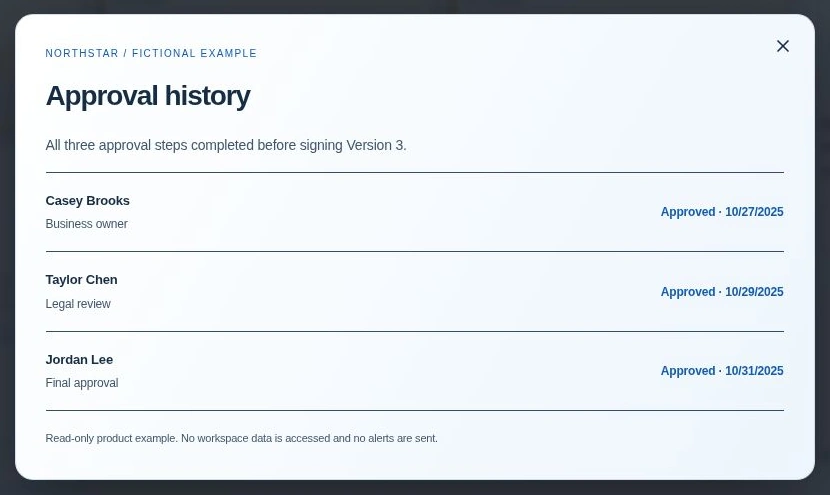
Open View approval progress on the fictional Northstar Services Agreement. The agreement card identifies Version 3.
The current document shows Approved. All three approval steps are complete. Choose Open approval to inspect the history.
The business owner approved on October 27, Legal on October 29 and the final approver on October 31, 2025. The history explicitly connects all three decisions to Version 3 before signing.
Before release, open the version in the decision record and compare it with the proposed signing copy. If they differ, hold the packet and reconcile the change. After signing, give the verified 60-day renewal clause to the owner of the renewal reminder process. See the approval workflow feature for the product’s routing options.
Measure the wait without blaming the reviewer
“Five days in Legal” can hide several different delays: an incomplete request, two days in a queue, half a day of actual review, and more time waiting for the requester to answer a question. Measure each handoff separately before changing the process.
For a small team, begin with four counts:
- requests returned because required information was missing;
- time from a complete request to the first reviewer action;
- requests sent back for changes, grouped by reason; and
- agreements sent for signature without approval of the current saved version.
Review a small sample monthly. If the same information is repeatedly missing, improve intake. If routine agreements wait behind exceptional ones, create a simpler route for the routine case. If reviewers keep revisiting the wrong version, fix the version handoff before adding reminders.
Small-team approval checklist
- Each stage names the decision, not just the department.
- Conditions use facts the requester or owner can verify.
- Sequential stages have a real dependency.
- Parallel reviewers see the same saved version.
- Comments and approvals are recorded as different actions.
- A changed version cannot rely on an earlier approval.
- The authorized signer receives the approved signing version.
- Post-signature dates and obligations have separate owners.
Start with one agreement type your team handles often. Keep the first route short, test it with fictional data, and add conditions only when a real decision requires them. A workflow is successful when people can explain why they are involved and the next person can find what was approved.
Frequently asked questions
Should contract approvals happen in sequence or in parallel?
Use sequence when one decision depends on another. Use parallel review when people can evaluate the same saved version independently. A short tested route is usually easier to maintain than making every reviewer wait in line.
Does a comment count as contract approval?
No. Treat comments, questions, change requests, approvals, and signatures as separate actions. Your process should record the explicit decision and the version it covers.
What happens to approval when the contract changes?
Save the changed draft as a new version and determine which decisions the change affects under your approved policy. Preserve the earlier history, but do not present an old approval as approval of new wording.
How many reviewers should a small contract team use?
Use the fewest reviewers needed for the actual decisions. Start with the business owner and add finance, legal, privacy, security, or another specialist only when a defined condition requires that decision.