Find the dates and the clause behind them
Start with the current agreement and its amendments. Identify the end of the current term, any automatic renewal terms, and the date or period for giving notice. The renewal date and the deadline to prevent renewal may be different.
Read whether notice must be sent or received by the deadline, who must receive it, and the permitted delivery method. If the wording or calculation is uncertain, involve a qualified reviewer. Our renewal notice deadline guide explains what to check.
Who should receive a renewal reminder?
Name one contract owner to coordinate the review. For a customer agreement, involve the sales account owner while there is still time to check usage, pricing and the customer’s plans. For a supplier renewal, procurement or the service owner usually has that information. A blanket copy to both departments leaves the question of who acts unanswered.
| Recipient | What belongs in the reminder |
|---|---|
| Contract owner and commercial lead | Link to the executed terms, the decision needed, and a date to return the customer or supplier recommendation. |
| Renewal decision maker | The quoted price, alternatives, recommendation and last internal decision date. Give a deputy the open items if the owner is away. |
| Designated notice sender | The authorized decision, required recipient, address, delivery method and proof to retain. Give this person time for delivery and a second attempt if needed. |
Work backward from the notice deadline
Fictional supplier agreement. A service term ends December 31, 2027. Its notice clause requires the supplier to receive written nonrenewal notice at the address in the agreement at least 60 calendar days before term end. An executed amendment confirms that address. The contract administrator checks both documents and records November 1 as the last receipt date.
The buyer allows 28 days before that deadline to open the review, 14 days to make the decision and seven days for an escalation if the decision is outstanding. These are the buyer’s planning choices. An agreement that counts business days, specifies a time or time zone, or allows notice only within a window needs its own calculation. Bring conflicting clauses or uncertain dates to counsel before activating the plan.
Fictional 2027 supplier agreement. Notice must be received 60 calendar days before the December 31 term end. The buyer chose 28, 14 and 7 calendar days of internal lead time.
- October 4, 2027Open the review
The contract owner asks procurement for pricing, service history and alternatives.
- October 18, 2027Make the internal decision
The budget owner records whether to renew, renegotiate or give notice.
- October 25, 2027Follow up if the decision is open
The contract owner escalates to the designated deputy and checks that the notice sender has time to act.
- November 1, 2027Last day for receipt
If nonrenewal was authorized, the notice sender checks delivery and files the copy and receipt.
- December 31, 2027Current term ends
Record the outcome and recalculate the next cycle from the effective terms.
Close the loop and update the record
Once the team decides to renew, renegotiate, or prevent automatic renewal, record the outcome and the responsible person. If notice is required, follow the agreement and retain appropriate evidence of delivery.
After an executed extension or amendment changes the term, review the saved dates, owner, and reminder plan. Explore ContraxAware contract reminder software to keep the next decision connected to the agreement.
Set up reminders for frequently renewed agreements
- Choose the basis. In ContraxAware, open the saved contract’s alert plan and check the date each reminder uses. Set the lead time against the verified action date. Review the local delivery time and time zone.
- Resolve the recipients. Select named people or contract-team roles. To notify sales for a customer contract, select its account owner as a named recipient or assign the person as a stakeholder and select that role. Check who it resolves to on this agreement.
- Choose when to follow up. An unanswered first reminder needs a backup. If someone acknowledges the reminder while the decision is still open, choose a follow-up that waits for the decision where appropriate.
- Reuse the pattern. A contract type can provide a default alert template for new agreements. Existing contracts keep their saved plans. Review each agreement’s own notice clause, personnel and dates before relying on a copied plan.
After a signed extension or a change of account owner, reopen the record. Check the next term, reset the relevant reminders and confirm the assigned people. If the team elects to leave, the notice owner keeps the authorized notice and the required proof of receipt. A meeting note saying “we decided to cancel” only documents the internal decision.
A contract reminder checklist your team can reuse
Use one record per agreement. Keep these fields beside the current signed document and any amendments so the next reviewer can verify the plan.
- Agreement and counterparty: identify the contract and the current version.
- Term end and renewal terms: record whether the agreement expires, renews automatically, or needs a new agreement.
- Verified notice deadline: save the relevant clause, recipient, delivery method and whether notice must be sent or received by the deadline.
- Internal review date: leave enough time for finance, procurement, legal and the service owner to contribute.
- Owner and reminder plan: name the person coordinating the decision and specify when they should review it.
- Decision and evidence: record the outcome, who must act, and evidence of any required notice.
- Next review: check the dates again after a signed amendment or renewal.
Already have the notice date? Use the reminder date planner to work out when the owner should start the review and when the next person should follow up.
When is a calendar reminder no longer enough?
A calendar entry can prompt a review, but it can become disconnected from the contract clause, an amendment or a change of owner. If your team repeatedly searches inboxes to work out what a reminder means, consider keeping the document, dates, responsibility and decision in one shared contract record.
ContraxAware’s Dates, Reminders & Renewals feature supports that workflow. See how to set up contract reminders, then test the process with one of your own agreements during a 14-day free trial. No credit card is required.
Plan the next renewal on one worksheet
Enter the source-verified notice deadline once. The worksheet calculates the review, decision and escalation dates from your own lead times and leaves space for the recipient, the decision and delivery evidence. Its sample uses the fictional 2027 agreement above.
Download the renewal and notice-deadline worksheet (Excel)
See how a notice date connects to the agreement
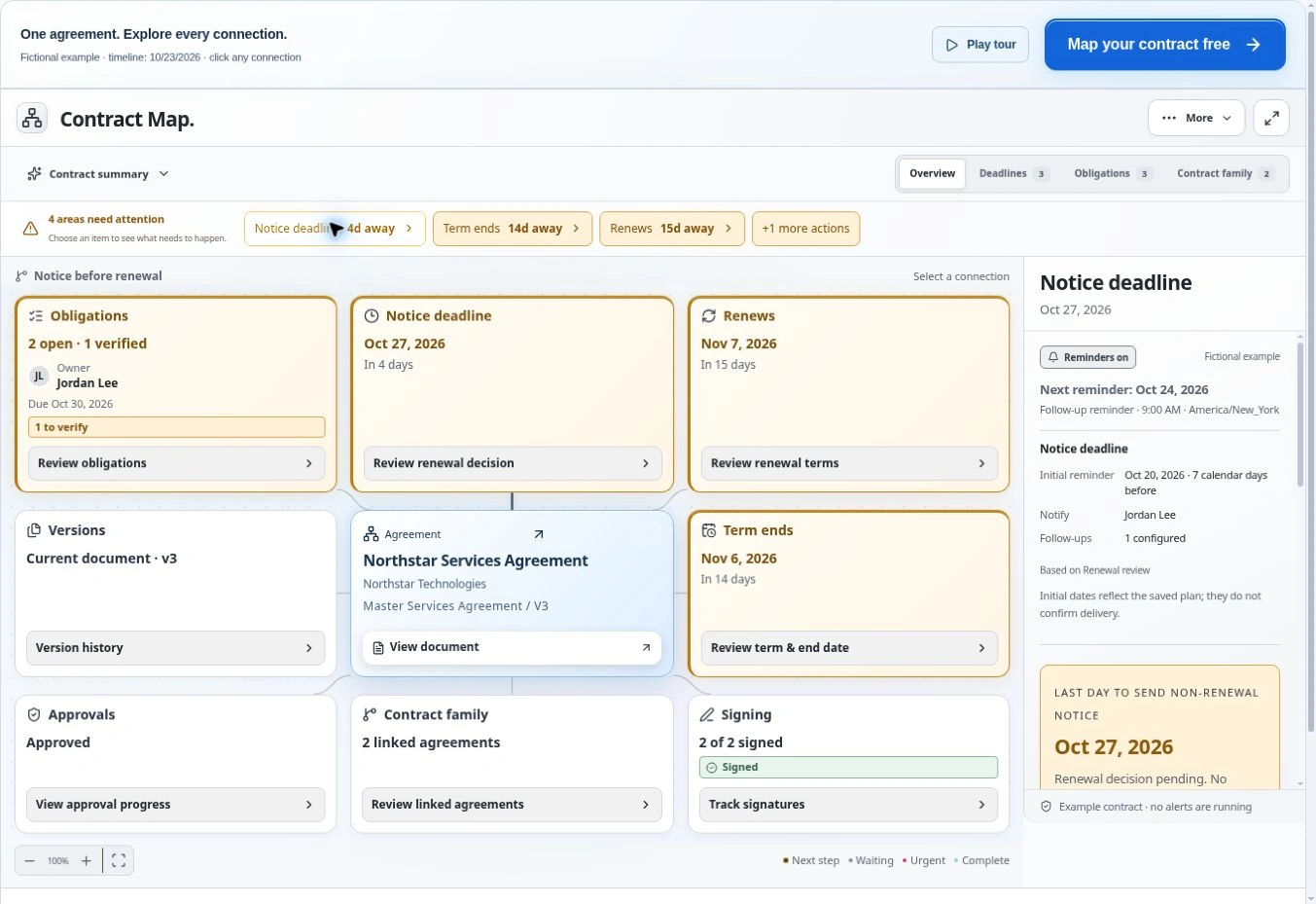
This 22-second recording uses a different fictional agreement, Northstar, in the actual Contract Map. Watch the selected tile to see which date starts the next term and which one requires action.
Read the video transcript
At 0:00 the Northstar agreement opens in Contract Map. At 0:04 selecting a tile reveals its connected record. At 0:08 the view shows that the notice deadline falls before the new term. At 0:12 notice is due October 27 and the next term starts November 7. At 0:15 the obligation shows its owner, due date and source clause.
To verify an extracted deadline, use the guide to finding the source clause. To try the workflow on an agreement you already manage, open the renewal reminder feature.
Frequently asked questions
What is the difference between a renewal date and a notice deadline?
The renewal date is when the next term starts under the agreement. The notice deadline is the last date the agreement allows for giving any required notice. Record both and verify the rule from the current signed terms.
How far ahead should we send an internal renewal reminder?
Work backward from the verified notice deadline. Allow enough time to review pricing, evaluate alternatives, get approvals, and prepare delivery if the decision requires notice.
Who should receive renewal reminders?
Start with the owner who can move the review forward. Add people who need to provide a decision or deliver any notice at the point they can still act.