Review the wording and the decisions.
Compare unsigned Word drafts, check proposed terms against company playbooks, and keep review history with the version your team approves.
Contract management for legal teams →LEGAL · PROCUREMENT · FINANCE · OPERATIONS
Bring supplier contracts, customer agreements, NDAs, and service commitments into one workspace. ContraxAware connects the document, the people who review it, and the work that follows signing—so every department can find its next step.
14 days free · No credit card required · Free migration assistance
A SHARED PROCESS. DISTINCT RESPONSIBILITIES.
Compare unsigned Word drafts, check proposed terms against company playbooks, and keep review history with the version your team approves.
Contract management for legal teams →Keep vendor agreements, renewal notice deadlines, related statements of work, and service obligations together with their responsible owners.
Explore procurement workflows →Review pricing schedules, payment milestones, and proposed changes beside the agreement instead of relying on a separate spreadsheet or forwarded attachment.
Explore finance workflows →Track onboarding, deliverables, insurance requirements, and supporting evidence. Keep reported completion distinct from the team’s verification.
Explore operations workflows →A PRACTICAL BUSINESS WORKFLOW
Procurement brings in the supplier’s Word draft. Legal reviews an insurance clause, finance checks the payment schedule, and the business owner approves the selected version. After signing, operations owns the onboarding obligation and the contract manager tracks the earlier non-renewal notice deadline. Each person works from the agreement and the responsibilities assigned to them.
Illustrative scenario · not a customer case study01
When agreements sit in individual inboxes, departments can end up working from different copies. A central contract repository connects the original document to the counterparty, contract type, owner, related agreements, and important dates.
Use Batch Import & Onboarding to bring in PDF and Word agreements, including existing signed contracts. With AI Contract Data Extraction, review proposed details beside their source before using them. AI-Powered Contract Search helps authorized colleagues find agreements in plain English; readable document text and access permissions determine what is available to search.
02
Contract management software for business should make it clear what the requester needs and who acts next. A supplier agreement to review needs different information from a customer NDA created from company wording.
Use Contract Intake & Templates to connect portal requests, contract types, and Word merge templates. Capture the business purpose and responsible team up front. Configure the review route and access for the people involved, then test a representative request before inviting more departments.
03
Use Contract Editing & Redlining for unsigned Word drafts, with saved versions and tracked changes. AI Contract Review & Playbooks helps reviewers check wording against company standards. AI findings and suggestions support the review; your people decide which terms to accept.
Choose the internal reviewers and approval stages appropriate to the agreement. Review the final selected version before requesting electronic signatures. Keep the signed original with the contract record so the next department can see what was agreed.
04
The end of the term is not always the date your business needs to act. Dates, Reminders & Renewals keeps notice deadlines distinct from renewal and expiration dates. Assign a decision owner, verify the clause, and plan reminders before the notice window closes.
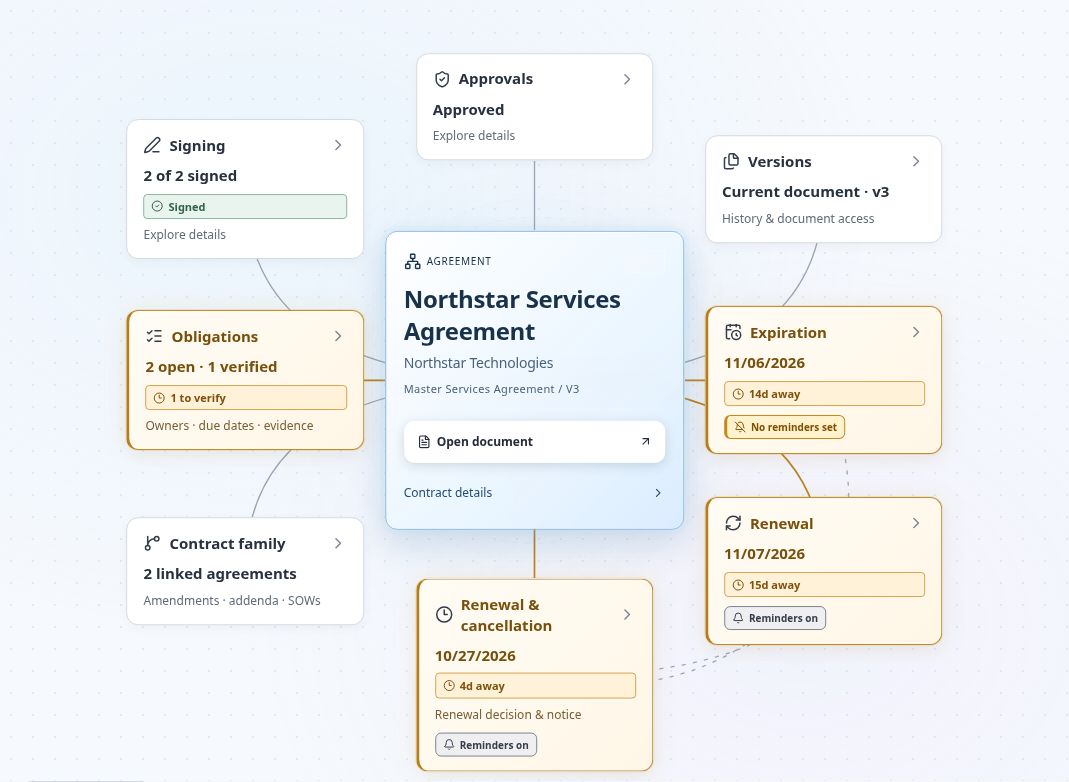
Track payments, training, service milestones, or insurance requirements as contract obligations with an owner, due date, source wording, and completion evidence. Contract Map brings these connections into one visual view. A reminder supports follow-up; it does not send a legal notice or change the agreement’s delivery requirements.
05
A business-wide rollout can begin with one agreement type, such as supplier services or customer NDAs. Gather the originals, configure fields and permissions, confirm extracted dates, and walk a sample agreement through review, signing, and follow-up. Then extend the process to more teams and contract types.
Use the feature matrix and current plans and contract volumes to compare what you need. Every published plan includes unlimited users and free migration assistance; feature availability and contract capacity vary by plan. Review the security and access details against your company’s requirements before rollout.
No. This page covers agreements shared across company departments, including legal, procurement, finance, and operations. Start with a representative workflow and evaluate contract volume, access requirements, and plan features with our team.
Yes. Configure contract types for customer agreements, supplier contracts, NDAs, statements of work, and other agreements. Keep their documents, owners, dates, and related records together.
Contract Portal supports requests and progress visibility for colleagues. Contract managers configure the contract type, templates, review process, and access needed for the work. Test the intended roles before expanding the rollout.
Yes. Import existing PDF or Word agreements, preserve the original, and review extracted details before tracking renewals and obligations. Existing signed contracts do not need to be sent for signature again merely to be managed.
Start a 14-day free trial with no credit card required. Choose a representative agreement and test the workflow and permissions you need. Contact us for migration help, plan details, or a discussion of your business requirements.
FROM THE FIRST REQUEST TO THE NEXT RENEWAL
Try one agreement with your team. 14 days free. No credit card required.
Compare plans and contract volumes →