 ContraxAware
Core chapter 12 of 18
Security, Permissions and Audit Trails
Design and test appropriate access, traceability and recovery responsibilities.
Executive summary
- Grant a task and a scope. Identify the person, the agreement or department they need and the actions they can take. Treat administrative access as a separate assignment.
- Test a boundary from both sides. Use fictional records and approved training accounts. Show that the intended reviewer can do the work and an unrelated user cannot see the material.
- Collect decision evidence. Match the actor, role, event time, record and saved document version. Verify which events your environment records and who can retrieve them.
- Prove a recovery claim. Agree the recovery target and ask for a timed, authorized demonstration. A downloaded archive establishes that a copy exists. Restoring a usable service requires more evidence.
Part A · The Why
Identify information and access risk
Confidentiality by entity, department and agreement type
Imagine two documents in a contract repository. One is a public supplier brochure. The other is an acquisition agreement with a confidential target name in its title. Protecting both with the same “every employee can view contracts” setting exposes a transaction before anyone even opens the file. Metadata can disclose as much as a document.
List the information people encounter during ordinary work. Include titles, counterparties, attachments, negotiation notes, search results, reminder subjects, exports and external invitations. Classify agreements with the teams who know the consequences of disclosure. A department may need to know that a service contract exists while payroll terms or a privileged analysis need a narrower audience.
Tie classification to the legal entity and purpose of access. A manager in one subsidiary may have a procurement role there and no authority over a sister company's employment records. Give the policy an owner who can resolve ambiguous cases. Record the reason for any exception and when its continued need will be reviewed.
Least privilege and separation of duties
Least privilege gives a person the access required for an assigned task. Describe the action precisely. Reviewing a price, commenting on proposed terms, editing contract language, approving an exception and administering users are different jobs. A role called manager says little until you can list which of those jobs it permits and for which records.
Separate duties where one person's unchecked decision could cause material harm. For example, an administrator might enter a supplier's revised rate while a finance owner verifies the change against an authorized agreement. The administrator needs the ability to record the information. The verifier needs the authority and evidence to judge whether the change is allowed.
Small teams sometimes combine roles. Recognize the combination and assign a practical compensating review. A business owner could review a dated list of administrative access changes each month while the system administrator handles routine requests. Document who performs the review and what happens if a person finds an unexplained grant.
Sharing, exports, integrations and offboarding
Follow the information when it leaves the contract record. A reviewer might receive a time-limited invitation, a colleague might download a permitted copy and a connected storage service might maintain a separate file. Removing the reviewer from one agreement does not establish that every independent copy disappeared. The offboarding procedure must cover the places where access actually exists.
Use the smallest useful audience when distributing reports. A renewal reminder may need an agreement identifier and a link to the authorized record. It seldom needs the entire negotiation history attached. When departments share mailboxes, confirm who can read that mailbox before sending sensitive details to its address.
For each integration, document its business owner, data categories, direction of transfer and what happens when the connection ends. Ask who will review access at the receiving service. A contract manager can own this inventory while IT handles credentials and technical administration. Keep secrets out of the inventory and reference the approved secure location when needed.
Understand the control layers
Authentication, authorization and audit evidence
Authentication establishes which account is acting. Authorization determines what that account is allowed to do. An audit trail records selected events for later examination. A successful login, an approval permission and an approval history entry each answer a separate question. A secure contract repository needs all three relationships to be understandable.
Consider a fictional reviewer invited to comment on one vendor agreement. The system must establish the reviewer's identity or invitation context, limit the permitted activity to the intended assignment and preserve whatever decision evidence the policy requires. Seeing the correct reviewer name on a task proves little about the visibility of a different confidential agreement.
Before agreeing that an audit trail satisfies a requirement, define the event. Do you need to know who approved a draft, who changed a permission, or who downloaded a document? Ask for one example of each event your policy requires. The evidence owner should know where it is kept and how it is retrieved for a legitimate request.
SSO, MFA and provisioning as distinct capabilities
Single sign-on (SSO) lets an organization use its identity provider for access to an application. Multifactor authentication (MFA) requires authentication using more than one distinct factor under the organization's policy. Provisioning creates or updates the application account and its access assignments. Deprovisioning removes or disables access according to a defined process.
Walk through a new employee's first week. HR authorizes the hire. IT assigns the correct identity group. The application account is created through an agreed provisioning process. The employee signs in under the identity provider's requirements and can access only the assigned work. A supplier's statement that it supports SSO answers just one part of that story.
Then walk through departure. Establish who informs IT, how quickly the identity and application assignment should change, what happens to existing sessions, and who receives open approvals and renewal tasks. A disabled login can leave an important decision assigned to someone who will never see it. Offboarding includes business continuity.
Retention, legal hold, backup and recovery responsibilities
A retention schedule says how long specified records should be kept. A legal hold may direct preservation for a particular matter. A backup supports recovery after loss or service disruption. A contract record can be subject to all three at once, with different owners and different instructions.
Give Legal or the designated records authority ownership of preservation directions and release. Give IT and the provider clear responsibility for backup and recovery coverage. The administrator should know which versions, attachments, signature evidence and audit events are included in routine retention and what happens when a hold applies. Never infer that a scheduled deletion is appropriate when an applicable hold is unresolved.
National Archives guidance offers an example of lifecycle requirements for US federal electronic records. Private companies can borrow its questions about capture, maintenance, disposition and transfer while applying their own retention rules. Hold instructions and applicable legal duties should come through the organization's responsible advisers. NARA electronic records management requirements
Validate controls with evidence
Access review, negative tests and exceptions
Build a small access matrix before changing settings. Each row has a test identity, its assigned role, a fictional record, one intended action and an expected result. Include what the person should be able to do and a normal action outside that assignment that should be unavailable. Keep evidence of the initial state.
For example, a Facilities reviewer can inspect an assigned facilities services agreement. The same reviewer has no assigned role on a restricted HR agreement. Use separate approved training accounts and the application's ordinary navigation to verify both outcomes. Record whether the user can see the title, open the record and retrieve its documents according to the policy being tested.
If a result is unexpected, record the affected training record and notify the responsible security owner through the agreed process. Preserve the small amount of evidence needed for review. The right next step is a controlled permissions investigation with the responsible team. There is no need to explore other people's records to make the point.
Audit coverage, retention and exportability
Start with one business question, such as who authorized a particular saved version of an agreement. Ask the administrator to retrieve the event, identify the actor and time zone, distinguish request from decision and associate the decision with the right document. A trail that lists “approved” beside a current filename can leave the underlying wording ambiguous.
Record coverage by event category. Include successful approval, rejection or return, relevant permission changes, user removal and any document access events your policy requires. Where a particular event is unavailable, document the gap and assign its owner. A provider's retention period may differ from the period your organization needs to investigate a dispute.
Restrict access to exported logs. They can contain user identifiers, commercial references or sensitive activity. Record who requested the export, the date range, time zone and originating system. Preserve the original file and make any authorized redactions on a separate copy so reviewers can distinguish source evidence from a prepared exhibit.
Recovery objectives and demonstrated restore procedures
Define the recovery point objective (RPO) as the point in time to which data must be recovered after an outage, commonly expressed as the maximum tolerable time window of data loss. Define the recovery time objective (RTO) as the targeted time for restoring the required operation. Agree what starts and stops the clock before judging a test. NIST recovery point objective · NIST recovery time objective
Suppose a fictional service fails at 10:00. An approved test restores usable data as of 09:30 and the business owner verifies the required operation at 12:15. The observed data gap is 30 minutes and elapsed recovery is two hours and 15 minutes under the agreed test clock. Compare these results to the organization's targets. Restoring a database file without usable contract attachments would fail a test that included those attachments.
A fictional case of a manager moving departments
Kestrel Packaging moved a facilities manager to Corporate Sales. IT changed the person's directory group, but a quarterly access review found an individual assignment on a sensitive facilities agreement. A manager title still looked appropriate in the directory. The old assignment was attached to a particular review and needed its own owner.
Kestrel compared the user's new duties with the open contract tasks. It removed the obsolete assignment, transferred the outstanding inspection decision to the new facilities lead and retained the previous decisions under their original authors. A test identity with equivalent assignments then performed ordinary access checks against two fictional records.
The team revised its transfer checklist. The department releasing an employee now identifies open approvals, recurring tasks, external shares and individually granted roles. The receiving manager authorizes new assignments. IT records when the identity change took effect. The next access review can verify both removal of the old authority and continuity of the work.
Part B · The How
Configure roles and scope in ContraxAware
Assign requestor, manager, approver and administrator roles
Work in an approved internal training workspace with fictional agreements. Set up four test personas with the application's authorized administrator. The requestor submits departmental work. The contract manager maintains assigned records. The approver provides the assigned decision. The administrator manages configuration. These are jobs in the exercise. Match them to the actual roles and settings available in your workspace.
Write a one-sentence purpose for each assignment. For example, “Avery can comment on the Northstar commercial terms during this review.” Identify a sponsor and an end condition for temporary authority. Keep permanent platform administration separate from the temporary approval assignment unless policy explicitly grants both.
Start with a small cohort. The owner should be able to explain why each persona exists, which fictional records it can see and whom to contact if access needs to change. Validate one complete decision before extending the model to more departments. Role-based contract permissions
Restrict records and documents to appropriate users
Use the Northstar Review & approve reference screen to examine one assignment before submission. The panel indicates that it concerns a saved document version and the current contract details. These controls describe one approval step and its document access.
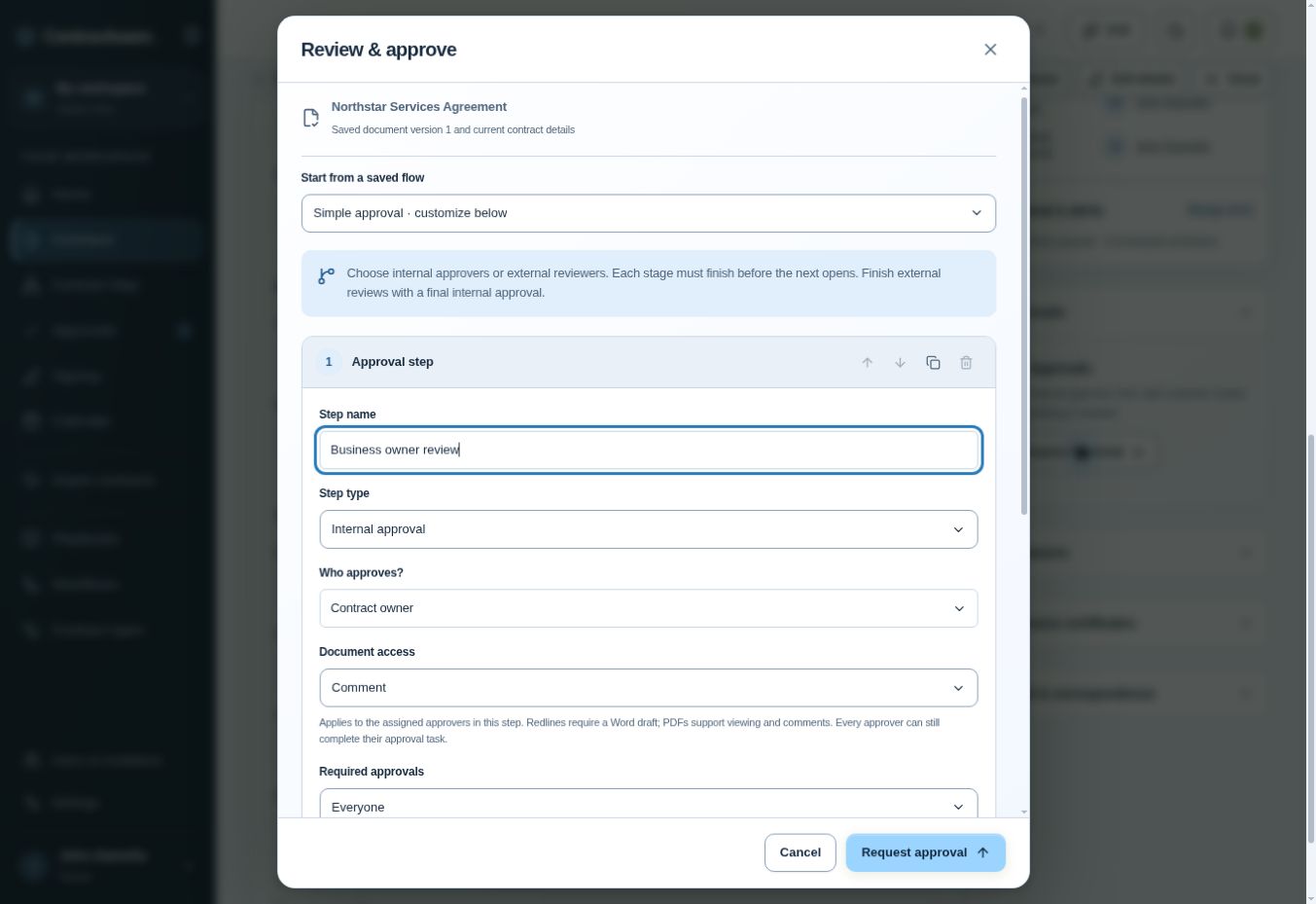
- Check Step name. The training example reads Business owner review.
- Check Step type and Who approves?. The example pairs Internal approval with Contract owner.
- Check Document access. The example is set to Comment. Keep the example there for a reviewer who needs to comment on business terms.
- Check Required approvals. Everyone applies to the approvers assigned to this step. For a configuration inspection, use Cancel when done.
Why this matters. The authority to decide and the ability to modify wording are separate settings here. Giving someone a business decision should not silently expand their authority over the document. This screen shows a prepared route. A completed approval needs its own evidence.
Test permitted and forbidden actions with separate accounts
Prepare two fictional test agreements, one Facilities record and one HR record. Authorize the test manager for both inside the training workspace. Assign the test department user to the Facilities work only. Write down the expected visibility for search, the record and its attachment before signing in as either person.
- Confirm ordinary access. With the authorized manager account, open both training records through the normal interface and check that the intended sample documents are present.
- Check the limited view. In a separate signed-in session, use the department user's normal navigation to locate the assigned Facilities work. Confirm that the HR sample stays outside the user's authorized view.
- Record the result. Note persona, record, time, expected action and actual outcome. Record only safe fictional identifiers. Send exceptions to the security owner for correction and retest.
Inspect decisions and access changes
Follow record history and approval/signing evidence
Choose a previously completed fictional approval in an environment authorized for training. Find the record, retrieve the saved document covered by the decision and inspect the decision evidence. Match the participant, action, timestamp and version. Where the evidence shows only a request sent, record that precise event and look separately for the decision.
Keep signing evidence associated with the completed signing process. An internal approval of the draft, a completed individual signature and a fully executed agreement may have different timestamps. Verify what was completed, which version each event refers to and where the final evidence is retained. The Northstar approval setup image cannot answer those later questions.
Review a permission change and user removal
Use a designated temporary test participant. First, record the fictional task the person can see and complete an ordinary access check. Have the authorized administrator remove the assignment through the normal process. Record who approved the change and the point when the new state should take effect.
Repeat the allowed checks under the agreed session conditions and observe the outcome. If existing sessions and new sign-ins have different documented lifetimes, test both through ordinary use. Record elapsed time and exceptions for the identity owner. Transfer any outstanding review so a departed person does not remain responsible for a live decision.
Then look at an older decision from the same test user. Confirm whether its attribution remains intelligible after removal. A history that preserves “who approved this” can still allow the person to lose current access. Those two outcomes should be independently demonstrable.
Confirm what the environment logs and retains
Create an evidence inventory for your workspace. For each required event, record the owning system, visible fields, retrieval method, access controls, retention period and the person who confirmed them. Separate identity-provider sign-in records from application decisions and signing-provider evidence where relevant.
Mark a missing field or unknown retention period as an open requirement. Give it an owner and identify when it must be resolved. Avoid populating the table with values taken from an unrelated customer's environment. The product's security page describes recorded contract changes, workflow events and document versions. Verify individual event coverage against your actual requirement. Contract management security
Check enterprise and operational controls
Verify SSO, MFA and provisioning during enterprise onboarding
ContraxAware's Enterprise plan describes corporate SSO, company-managed MFA and access policies, and automated user provisioning and deprovisioning through SCIM. Its published terms describe confirming these controls during enterprise onboarding before the workspace is activated. Agree the identity provider, assigned groups, exception owners and timing targets with the implementation team. Enterprise plan details
Use one approved test identity through its entire lifecycle. Record its starting assignments. Have the identity administrator authorize it for the intended group, confirm the expected sign-in policy and inspect the permissions the application grants. Then transfer or remove the test identity through the normal process. Compare the observed scope and elapsed time against the acceptance criteria.
Record confirmed configuration and test evidence
Keep a dated acceptance record with the environment, policy version, group mapping, test persona, expected outcomes, actual observations and approver. Reference the restricted evidence location for each result. Store only what the review needs. Authentication codes, recovery secrets and live credentials have no place in a training screenshot.
Record policy exceptions explicitly. For example, a designated emergency administrator may have a separate approved access method, a custodian and an independent review requirement. Have the security team establish and exercise that procedure. Do not infer that enterprise access controls or a certification meet your specific needs until the authorized owners have examined the applicable evidence.
What four records establish after a role change
A fictional Facilities reviewer moves to Sales. Preserve these four pieces of evidence when the old assignment ends.
- Group updatedIdentity record
The identity owner records when the Facilities assignment was removed and the Sales assignment authorized.
- RestrictedContract scope
The designated test user can perform the new assigned task and cannot see the restricted Facilities training record.
- Still attributableDecision history
A prior approval still identifies its original actor, time and saved document version.
- ReassignedOpen responsibility
The replacement owner accepts the outstanding facilities decision and its original deadline.
Identity, application access, historical evidence and unfinished work answer four different questions during offboarding or transfer.
Assign backup, recovery and incident-response responsibilities
Ask the provider and your own IT team to identify who backs up documents and records, who can request restoration, which objects and settings a recovery covers, and what steps the customer must perform. The published ContraxAware security page distinguishes a customer archive from a restore facility. It states that customer restore functionality is unavailable and publishes no recovery-time commitment on that page. Confirm service arrangements separately for your implementation.
Give each part of the test an owner. IT records timing. The contract manager verifies that documents open and key fields are present. The business owner confirms that approval evidence and upcoming deadlines are usable. The security owner verifies access boundaries after recovery. A report should name the last successful test and every exception awaiting action.
Set an internal reporting route for suspected exposure or loss. Preserve relevant event references, inform the designated incident lead and follow the organization's response process. The incident lead coordinates authorized containment, investigation and any required notices with appropriate advisers. NIST incident response guidance
Practice an access handoff and recovery review
Give another administrator your two-record access matrix. They should reproduce one allowed task, one unavailable task and the expected result after removing an assignment. Ask them to explain which approval evidence remains available and which details would need the identity administrator's records.
For the advanced challenge, tell the reviewer that the former user previously downloaded a permitted training file. Revoking the application role controls subsequent access under the tested conditions. Address the existing external copy through the organization's managed-device, information-handling and offboarding processes. Record who follows up and what evidence those processes can actually provide.
John's Builder Note
I want a permissions screen to answer a human question. What will this person be able to do when I finish? Naming the reviewer is only half the job. Show the task, the document and the scope together. Then put the software in the hands of someone with that role and watch an ordinary review from their side.
Questions from the field
Can the contract administrator approve their own access change?
Use the company's authority policy. A practical design assigns business approval for material access changes to a separate accountable person and lets the administrator implement the approved change. Keep the request, the reason, the approval and the resulting access review together.
What evidence should I ask for after a restore test?
Ask for the scope, recovery point, start and finish times, result against the agreed targets, objects checked, access checks and unresolved exceptions. A business owner should confirm that people could resume the particular contract operation included in the test.
Optional knowledge check
Choose your answer, then open the explanation.
Show answer
An approved test account with no permission for the practice record. A negative test verifies the access boundary. Administrator success alone says little about least privilege.
Show answer
No; identity and authorization solve different problems. SSO authenticates identity; permissions determine which records and actions that identity may access.
Show answer
A documented, successful restore test against defined objectives. Recovery evidence should show that usable data can be restored within the organization’s objectives.