 ContraxAware
Core chapter 9 of 18
Electronic Signatures and Contract Execution
Move the approved agreement through signing and preserve the evidence needed after execution.
Executive summary
- Prepare the commitment. Confirm the approved content, legal entities, authorized signers and complete signing package before sending a request.
- Separate the evidence. Identity, authority, consent, document integrity and completion answer different questions. A status badge cannot answer all of them.
- Keep dates distinct. Approval, signature completion, effectiveness and service commencement may occur on different dates. Use the agreement’s actual terms.
- Finish the handoff. Retain the completed agreement and signing evidence, then assign the obligations and decisions that begin after execution.
Part A · The Why
Understand what makes execution reliable
Intent, consent, attribution and document integrity
A reliable signing process should let the team explain who acted, what they intended to do and which document they acted upon. Consider consent to the chosen process, the evidence connecting the action to the signer and the integrity of the resulting record. These are related questions with different evidence.
For covered US transactions, 15 U.S.C. § 7001 generally prevents electronic form alone from being the reason a signature or contract lacks legal effect. It preserves other legal requirements and generally does not compel a person to accept electronic signatures. Special conditions can apply to electronic delivery of legally required consumer disclosures.
Translate legal review into an approved operating procedure for the agreement type. Define the acceptable signing method, recipient verification, required acknowledgments and retained evidence. Administrators should follow that procedure and raise exceptions rather than assume a particular technology resolves every question of enforceability.
Authorized signers and organizational entities
Confirm the entity making each commitment. Trading names, subsidiaries and similarly named affiliates can cause confusion. Check the agreement’s party definition, signature block and approved transaction record together. A signer’s email domain alone does not establish the correct contracting entity.
Verify the person’s authority through the organization’s accepted process. Internal delegation records may define limits by entity, value or agreement type. For the other party, obtain the confirmation or evidence your policy requires. Identification and authority are separate checks even when the same person performs both.
Record the basis of the authority check with appropriate access. Avoid collecting unnecessary personal information. If a named signer is replaced, revisit both the recipient details and authority rather than simply changing the address on an existing request.
Legal exceptions and jurisdiction-specific review
Electronic execution requirements depend on the transaction and applicable law. 15 U.S.C. § 7003 identifies exceptions to the federal rule, including specified testamentary, family-law and notice contexts. An exception requires separate legal analysis and is not a blanket statement that every electronic method is prohibited.
Ask counsel to define when additional formalities, witnesses, notarization, prescribed delivery or another method is required. Cross-border transactions need the appropriate jurisdictional assessment. Keep that determination with the signing procedure so an administrator is not improvising at the point of execution.
Build a clear escalation trigger into intake. An unfamiliar agreement type, disputed signing method or unusual signer arrangement should prompt review before invitations go out. The useful question is what execution procedure applies to this transaction and who has confirmed it.
Prepare the signing package
Approved version, required attachments and signature fields
Start with the exact approved content and its incorporated attachments. Compare the proposed signing file against the approval reference. Check party names, schedules, selected options, blanks and signature blocks. A clean-looking PDF can still contain an obsolete schedule or an unresolved drafting instruction.
Create a package inventory. Identify each document, its version or other stable reference, its purpose and whether it must be included in the signing record. Confirm how the chosen signing method handles attachments. Do not assume every linked supporting file becomes part of the document the recipient signs.
Assign signature and related fields to the correct people. Check required names, titles, dates and any other approved fields. Inspect placement on every relevant page, especially after a revised document changes pagination. The preview should make the recipient’s task clear without hiding material content.
Check the reading experience as well as the fields. A recipient should be able to read the document at a usable size and identify the material they are accepting. If an accessibility need or device limitation prevents that, use the organization’s approved alternative procedure before proceeding.
Signing order and multiple parties
Decide whether the parties can sign independently or whether one signature depends on another. The answer may come from policy, transaction requirements or agreed commercial procedure. Document the intended order and verify that the configured process matches it.
Identify every required signing capacity. One person may act for one entity while another signs for a different entity. A copied recipient, witness or information contact has a different role from an authorized signatory. Avoid treating everyone receiving the document as someone who can bind a party.
Check the completion rule. The process should make clear which required actions remain and what counts as complete. For a two-party agreement, one finished signature ordinarily leaves another required action outstanding under the configured package. Observe the actual status rather than relying on a single recipient’s completion email.
Cancellation, correction and expired requests
Prepare a correction procedure before an error occurs. If the wrong file, signer or entity is discovered, pause the process and determine the appropriate action in the verified signing system. Preserve the reason and the relationship between the original request and any replacement.
Distinguish correcting recipient information from changing the contract’s substance. A material content change may require a new approved version and a new signing package. Do not silently replace a document while continuing to describe it as the same approved request.
An expired or canceled request needs a recorded outcome. Confirm whether any recipient already acted and ask the responsible reviewer how that affects the next step. Keep the earlier evidence available under policy. A new request should have a clear reason and an identifiable current package.
A fictional case — three dates and one missing schedule
Cedar Analytics prepares a fictional support agreement for a customer. The practice record shows approval on October 15, 2027. During the recipient preview, the administrator discovers that the service schedule is missing. The team corrects the package and confirms the required approval covers the complete content before sending it.
In this fictional example, both authorized parties complete the corrected signing package on October 18. The agreement expressly states an effective date and service start of November 1. The administrator records these as separate events and retains the source for the November date rather than overwriting it with the final signature timestamp.
The correction matters as much as the dates. A completion record for an incomplete package would not establish that the missing service schedule was signed. The resulting evidence pack connects the approved complete document, authorized recipients, completed artifact and operational dates.
Approval, completion and effectiveness are different events
Fictional Cedar Analytics practice agreement. Dates are teaching assumptions, separate from the Northstar screenshots.
- 15 Oct 2027Content approved
Record the complete approved content and required attachments before preparing the package.
- 18 Oct 2027Signatures complete
Both authorized parties complete the corrected package. Retain the artifact and corresponding evidence.
- 1 Nov 2027Effective and service start
The example agreement expressly sets this date. Verify it separately from signature completion.
Use the agreement’s actual terms and evidence. A signing timestamp does not automatically establish the effective or service-start date.
These dates are fictional assumptions for Cedar Analytics and are separate from the Northstar screenshots. Keep the two examples separate in your practice log. For each date, identify the event it describes and the document or record that would establish it in an actual agreement.
Preserve execution evidence
Completed document and audit evidence
Retain the completed document in a form the organization can open and retrieve. Preserve the signing evidence supplied by the method used, such as the request reference, recorded events and available completion report. Confirm what the system actually produces before promising a particular certificate or authentication record.
Connect this material to the contract record and approved version. Another person should be able to locate the signed agreement, determine which parties completed the process and understand its relationship to the reviewed draft. A notification email alone is a weak substitute for that evidence bundle.
Keep authority evidence and relevant execution decisions available under the appropriate access rules. Apply the organization’s retention and legal-hold requirements. Test retrieval using an authorized colleague so the record remains usable after the original administrator changes roles.
Record a failed retrieval as a defect with an owner. An attachment that opens only from one person’s mailbox or a temporary link can leave the company without a dependable working record. Confirm that the retained copy remains accessible through the intended records process.
Completion timestamps and effective-date distinctions
A timestamp records an event in the signing process. The agreement may define effectiveness by a stated date, the last signature, satisfaction of a condition or another mechanism. Read that definition and obtain clarification when it is ambiguous. Do not infer a legal effect from a software label alone.
Record timezone information where it matters. If parties sign around midnight in different locations, the displayed date can depend on the system’s convention. Preserve the underlying event evidence and use the approved interpretation for operational deadlines.
Separate service commencement, billing commencement and term expiration if the agreement distinguishes them. A signed contract can have future performance dates. Map each operational field to the source clause or authorized determination so later reports do not merge different events into one convenient date.
Transition into obligations and renewal management
Execution begins another set of responsibilities. Identify onboarding requirements, deliverables, payments, insurance evidence, reporting, renewal decisions and notice obligations that apply to the completed agreement. Assign each to a responsible owner with the appropriate source and timing basis.
Confirm the first handoff directly. The service owner should know when performance begins and which prerequisites remain. Finance should receive the approved payment information. The renewal owner should know the decision date and the notice requirements, rather than waiting for an expiration reminder.
Use contract lifecycle management to connect these responsibilities to the saved agreement. Signing completion and operational readiness may differ. The administrator’s work is complete only when the next responsible people can identify and perform their tasks.
Part B · The How
Prepare signing in ContraxAware
Confirm approved content and signer details
Begin in an authorized training environment with a fictional agreement and controlled recipients. Identify the approved document, required attachments, contracting entities and signers. Confirm each person’s authority through the practice record supplied by the facilitator.
Use a preparation sheet with one row per required signer. Record the entity, role, training address, authority reference and intended signing order. Keep copied recipients separate. Compare the sheet with the agreement before entering details in the verified signing interface.
ContraxAware provides built-in electronic signatures for contracts. Complete the preparation check in your training agreement before starting a request. Use the signing-status example later in this chapter to practice matching the displayed people and status to the expected parties.
Set required signers, fields and order
Use the signing setup available in your verified environment to enter the approved training recipients. Match each field to the correct signer and inspect its placement. Compare the configured order with the preparation sheet, including any dependency that requires one party to act first.
Work through the setup one party at a time. Check the recipient against the contracting entity, confirm the assigned fields and review the order before moving to the next party. Record the resulting configuration in your preparation sheet. If a required option is unavailable or unclear, ask your administrator to resolve it before sending.
Preview with training recipients before any real send
Inspect the complete recipient-facing document through the supported preview or controlled test procedure. Check every page, attachment and assigned field. Verify that the recipient can understand who is asking them to sign, the entity they represent and the document presented.
Have the facilitator confirm the training addresses and environment before any test notification. Use only recipients authorized for the exercise. Record what was checked and any defect corrected. A prepared package can be assessed without sending a real counterparty an invitation.
If the preview reveals a material change or missing attachment, return to the approval reference. Correct the package and repeat the required verification. Confirm that the corrected recipient preview contains the approved content and all required attachments before continuing.
Follow the signing process
For a one-person practice run, invite your own workspace email. Use Preview as signer to check the two-page practice packet, confirm the recipient and send the invitation. Open the private signing link as the invited account. Review each page. If the bottom of a page is hard to reach, choose Fit to height and then Show next page. Select the yellow signature field and choose Use this signature here.
The signature preview is still editable. At final confirmation, read both statements and request the eight-digit email code. Keep the signing page open and enter the latest code there. Select Sign agreement and look for Your signature is saved.
Use the native signing path in the verified environment
The following image shows ContraxAware’s Contract Map with Signing selected and Details open. It is explicitly labeled a fictional example. Its sample status is 2 of 2 signed, and the central card identifies Northstar Services Agreement.
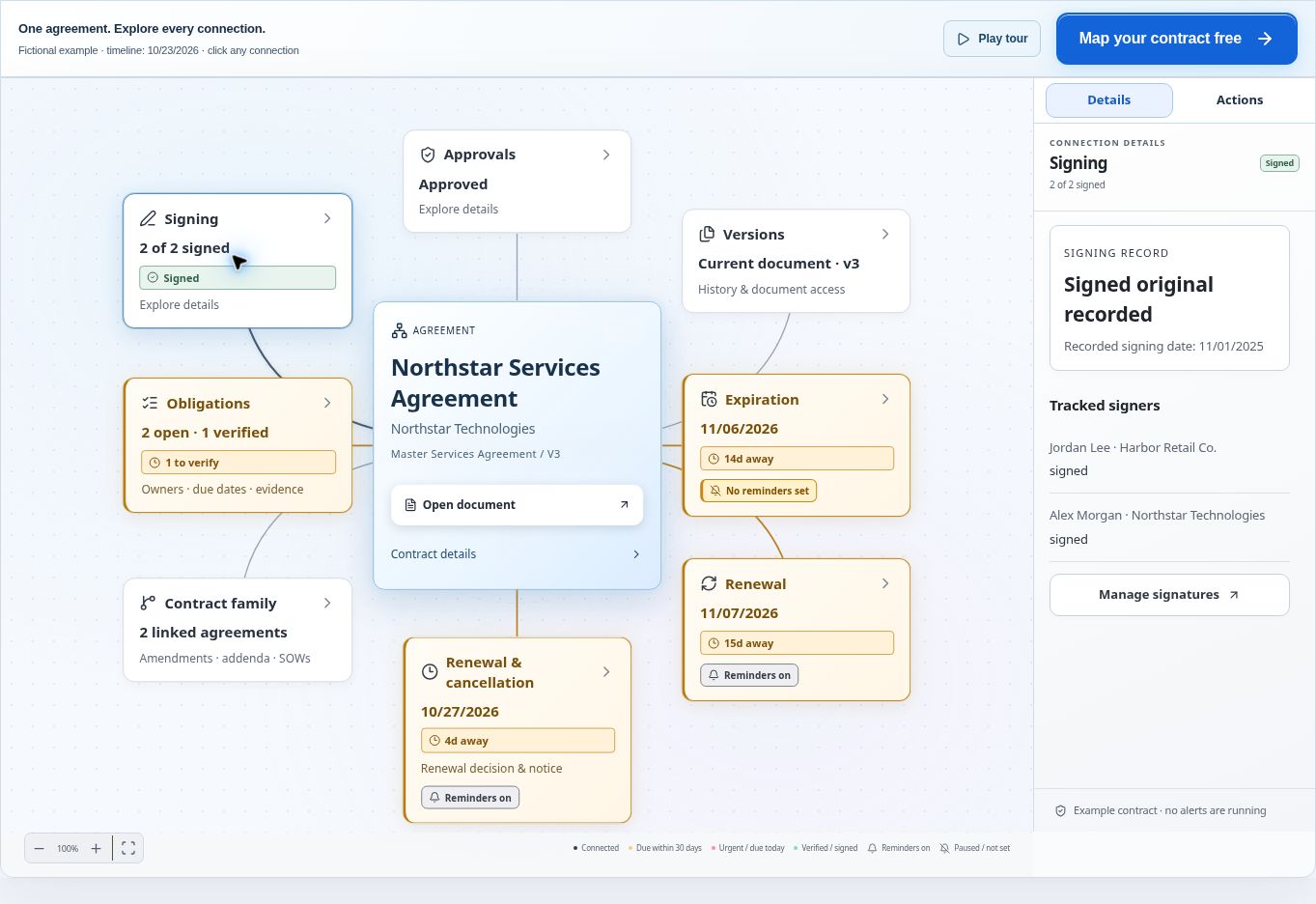
Read this specimen in three steps. First identify the agreement. Next inspect Signing and the corresponding right-hand panel. Then compare the people under Tracked signers with the expected parties. The panel shows Jordan Lee for Harbor Retail Co. and Alex Morgan for Northstar Technologies.
Locate Manage signatures and Open document in the example. In your own training record, inspect the current signing information and document before taking any further action. Keep this fictional status specimen separate from the earlier unsigned draft exercises. Their screenshots do not establish that the draft progressed through signing.
Track outstanding parties and handle corrections
In a live training run, compare the required recipient list with actual recorded actions. Identify who remains outstanding and whether the process is waiting, interrupted or complete according to the verified interface. Keep a short action log for corrections and follow-up.
The map specimen displays Signed original recorded and a recorded signing date of 11/01/2025. These are illustrative sample values. Its Current document · v3 label belongs to this specimen and must not be treated as the next saved version of the separate unsigned editor example.
If the controlled exercise produces an error, document the issue and use the approved correction procedure. Preserve the original reference and any completed actions. Reopen the request after a cancellation, replacement or retry and check its actual state. Record the outcome and remaining action. If the result is unclear, ask your administrator to resolve it before proceeding.
Test an external signing connector before using it
The contract integrations page describes the integrations publicly documented for ContraxAware. Confirm that the external signature provider you intend to use is supported, connected and configured in your workspace.
Before using a connector for an actual agreement, verify the provider, permissions, account connection, supported document types and return of completion evidence. Run one controlled package through the entire path. Check where the signed artifact and status arrive and how you would identify and resolve a failed return.
Identify whether your agreement uses native signing or an external connector. Follow the procedure for that path because its terminology and correction behavior may differ. If the connector test is incomplete, keep the agreement in preparation and resolve the missing configuration or evidence with your administrator before sending through it.
Confirm and operationalize completion
Return to the contract as manager. In Signatures, choose Review & activate, check the signed version and signer, then Continue to activation. If the effective date is missing, select Complete requirements and Set date. Use the agreement’s effective date, save the details, and confirm the displayed date before activating it.
Save the completed document and signing evidence
After the authorized sandbox exercise completes, retrieve the resulting document and available signing record through the verified interface. Open the document and inspect the parties, signatures, pages and attachments. Compare it with the approved package, allowing for the intended signature fields and recorded execution details.
Record where the completed artifact and evidence are retained. Confirm that an authorized colleague can retrieve them from the contract record. If an export is part of the configured process, verify the actual exported file rather than assuming a configured destination guarantees successful delivery.
Use the document identifiers and evidence actually supplied by the signing system. If the product exposes an integrity check, verify its meaning and result before recording it. Do not describe a file as cryptographically validated merely because it has a signature image or a completion label.
Verify effective and contractual dates separately
Read the completed agreement’s date provisions before updating operational fields. Record the signing-completion event separately from the effective date, service start, expiration and renewal dates. Where a date depends on another event, retain the source and the verified event used in the calculation.
For the fictional Cedar exercise, October 18, 2027 is signature completion and November 1 is the stated effective and service-start date. Keep both. In the separate Northstar map specimen, the recorded signing date alone cannot establish the complete effective-date terms.
Ask a second learner to trace each entered date back to evidence. A correct-looking date without a source is difficult to maintain when an amendment or correction arrives. Resolve inconsistent documents or ambiguous wording with the responsible reviewer before relying on the fields.
Assign obligations and schedule the first post-award review
Create the initial operating handoff from the completed agreement. For each selected obligation, identify the source, responsible owner, due-date basis, required evidence and escalation contact. Use verified product controls in the training environment and inspect the saved result.
Schedule the first review around the agreement’s actual needs. A service beginning later may require readiness checks before commencement. An immediate service may require prompt onboarding and invoice validation. Record the purpose of the meeting so it produces decisions and evidence.
For an obligation triggered by a later event, identify who records that event and who verifies it. The due date cannot be maintained reliably if nobody owns the trigger. Keep an unresolved commencement or acceptance event visible until the agreed evidence establishes it.
Practice — assemble the execution evidence pack
Use a facilitator-supplied fictional two-party agreement and authorized training recipients. The exercise requires a verified signing environment. If only a static example is available, complete the preparation and evidence review portions, then record the live completion portion as unperformed.
- Identify the authority. Match each party and signer to the supplied practice authority record.
- Check the content. Reconcile the approved reference, required attachments and proposed signing file.
- Prepare the recipients. Verify training addresses, field assignments and required order in the actual setup.
- Inspect the preview. Confirm the full recipient experience and correct any discrepancy before the authorized test run.
- Verify completion. Retrieve the completed artifact and corresponding evidence, then inspect the required parties and document contents.
- Hand off the agreement. Record distinct dates and assign two sourced obligations with owners and evidence requirements.
The expected pack contains the approved reference, authority basis, preparation check, completed test artifact, available signing evidence and operational handoff. A peer should trace the package from approval to performance without confusing a sample status screenshot with evidence from the test.
For the advanced challenge, the signing record identifies an employee but a later dispute concerns that employee’s authority. A strong answer preserves the event evidence and separately examines the authority record, applicable procedure and legal assessment. It also recognizes that consent, document completeness or a transaction-specific formality may require evidence beyond the event log. A completion badge alone cannot resolve those questions.
Check four results before marking the exercise complete. The package contains the intended content, the required people have a documented authority basis, completion evidence matches the package and the operational handoff uses sourced dates. Ask a peer to trace these connections and repeat any part that lacks supporting evidence.
John's Builder Note
I would make the final preparation check short enough that people actually use it and precise enough that it catches an expensive mistake. Ask which document, which entities, which people and which evidence will remain afterward. Then confirm the next operational owner. A signing workflow earns trust when the team can explain the completed record without reconstructing it from scattered messages.
Questions from the field
Does the final signature always start the contract term?
Read the agreement’s effective-date and commencement provisions. They may identify a stated date, final signature or another condition. Preserve the signature event, then record the applicable operational dates with their sources. Ask the responsible reviewer to resolve ambiguity.
Can we retain only the completion email?
Retain the completed agreement and the relevant available signing evidence under organizational policy. The email may help identify the request, but it may not contain the full document, attachments or event record. Test that another authorized person can retrieve the complete evidence pack.
Can the Northstar signed map prove the earlier draft was executed?
No. The map is a separate fictional status specimen. Its sample signers and recorded date explain the interface, while the redline screenshot remains an unsigned draft example. Real training completion requires evidence from the same controlled agreement and signing request.
Optional knowledge check
Choose your answer, then open the explanation.
Show answer
Approved version, signer authority and signing details. Correct content, authorized parties and correct fields are prerequisites for a reliable signing process.
Show answer
No; use the agreement’s effective-date terms. Execution and effectiveness can be defined differently. Verify the agreement rather than substituting a timestamp.
Show answer
The executed agreement and relevant signing evidence. The team needs the completed record and its supporting execution evidence for later administration.